


Before we begin:
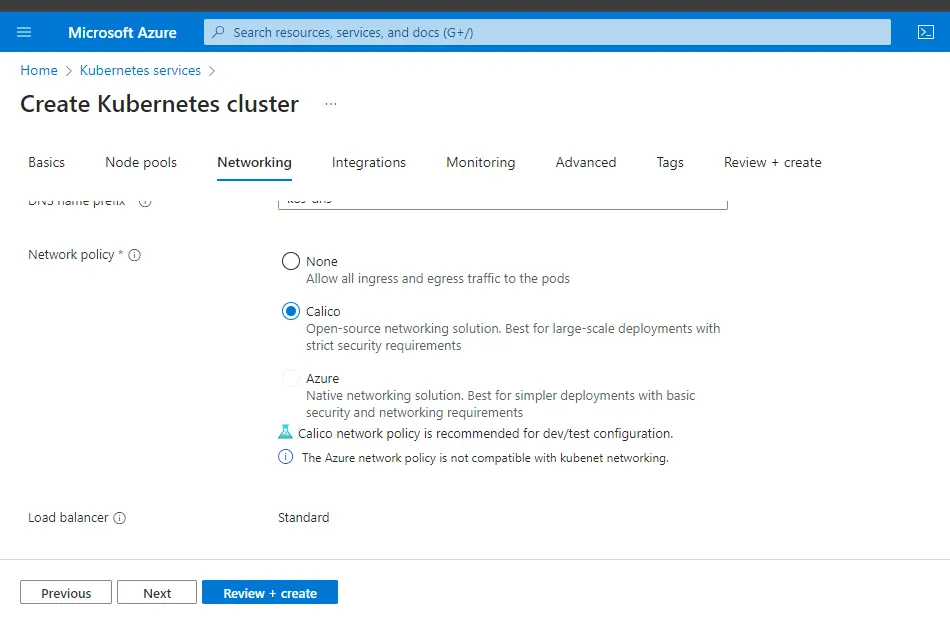
Make sure to have calico as the network provider for the k8s cluster.
Introduction:
By default k8s allows all pods to communicate with each other in a cluster across namespaces.
But what if we want to restrict and implement rules to decide which pods are allowed to communicate to other pods.
Enter network policy. To implement these policies we have to use CNI plugins.
Not all the network plugins support this. There are few like calico, weave etc. In this demonstration we’ll be using Calico.
All the example yaml are available on this Github repo.
Calico:
Calico is a Kubernetes Container Network Interface (CNI) plug-in which provides networking for containers and pods.
Getting Started:
I have a cluster with default namespace and other builtin namespaces and will set up a different namespace later. (Calico has a separate ns of itself).
First lets create 3 pods to test the communication among pods. Get the ips of pods with -o wide
labputer [ ~ ]$ kctl run web --image=nginx -l app=web
pod/web created

labputer[ ~ ]$ kctl run db --image=nginx -l app=db
pod/db created
labputer [ ~ ]$ kctl run test --image=nginx -l app=test
pod/test created
labputer [ ~ ]$ kctl get pods -o wide
NAME   READY   STATUS    RESTARTS   AGE   IP            NODE                          NOMINATED NODE   READINESS GATES
db     1/1     Running   0          41s   10.244.0.19   aks-np1-49452408-vmss000000   <none>           <none>
test   1/1     Running   0          29s   10.244.0.20   aks-np1-49452408-vmss000000   <none>           <none>
web 1/1 Running 0 53s 10.244.0.18 aks-np1-49452408-vmss000000 <none> <none>Now enter one pod and will ping another pod. For example I will enter the web pod and ping the db pod. And then will ping the db pod from the test pod.
DB pod ip here: 10.244.0.19
You may need to install ping, based on the images being used.
apt update && apt install iputils-ping
labputer [ ~ ]$ kctl exec -it web -- bash
root@web:/# ping 10.244.0.19
PING 10.244.0.19 (10.244.0.19) 56(84) bytes of data.
64 bytes from 10.244.0.19: icmp_seq=1 ttl=63 time=0.291 ms
64 bytes from 10.244.0.19: icmp_seq=2 ttl=63 time=0.108 ms
64 bytes from 10.244.0.19: icmp_seq=3 ttl=63 time=0.090 ms
^C
--- 10.244.0.19 ping statistics ---
3 packets transmitted, 3 received, 0% packet loss, time 2053ms
rtt min/avg/max/mdev = 0.090/0.163/0.291/0.090 ms
root@web:/#
------------------------
labputer [ ~ ]$ kctl exec -it test -- bash
root@test:/# ping 10.244.0.19
PING 10.244.0.19 (10.244.0.19) 56(84) bytes of data.
64 bytes from 10.244.0.19: icmp_seq=1 ttl=63 time=0.186 ms
64 bytes from 10.244.0.19: icmp_seq=2 ttl=63 time=0.069 ms
64 bytes from 10.244.0.19: icmp_seq=3 ttl=63 time=0.103 ms
^C
--- 10.244.0.19 ping statistics ---
3 packets transmitted, 3 received, 0% packet loss, time 2051ms
rtt min/avg/max/mdev = 0.069/0.119/0.186/0.049 ms
root@test:/#So as we can see here, we can ping all the pods from each other meaning communication is allowed.
Allow only a specific pod :
Suppose we want the db pod to allow incoming requests from only the web pod, then we create a network policy defining the ingress rules for the db pod.
Apply the below yaml:
# netpol.yml
apiVersion: networking.k8s.io/v1
kind: NetworkPolicy
metadata:
 name: dbpolicy
spec:
 podSelector:
  matchLabels:
   app: db
 policyTypes:
 - Ingress
 ingress:
 - from:
   - podSelector:
      matchLabels:
app: webApply the policy and test the connection again.
kctl create -f netpol.yml
networkpolicy.networking.k8s.io/dbpolicy created
--------------------
test --> db #does not work
labputer [ ~ ]$ kctl exec -it test -- bash
root@test:/# ping 10.244.0.19
PING 10.244.0.19 (10.244.0.19) 56(84) bytes of data.
^C
--- 10.244.0.19 ping statistics ---
59 packets transmitted, 0 received, 100% packet loss, time 59400m
---------------------
web --> db #works
labputer [ ~ ]$ kctl exec -it web -- bash
root@web:/# ping 10.244.0.19
PING 10.244.0.19 (10.244.0.19) 56(84) bytes of data.
64 bytes from 10.244.0.19: icmp_seq=1 ttl=63 time=0.296 ms
64 bytes from 10.244.0.19: icmp_seq=2 ttl=63 time=0.085 ms
64 bytes from 10.244.0.19: icmp_seq=3 ttl=63 time=0.135 ms
^C
--- 10.244.0.19 ping statistics ---
3 packets transmitted, 3 received, 0% packet loss, time 2047ms
rtt min/avg/max/mdev = 0.085/0.172/0.296/0.090 ms
root@web:/#Now delete the netpol and we shall the connection being allowed again.
labputer [ ~ ]$ kctl get netpol
NAME       POD-SELECTOR   AGE
dbpolicy   app=db         4m29s
-----------------
labputer [ ~ ]$ kctl delete netpol dbpolicy
networkpolicy.networking.k8s.io "dbpolicy" deleted
labputer [ ~ ]$ kctl exec -it test -- bash
root@test:/# ping 10.244.0.19
PING 10.244.0.19 (10.244.0.19) 56(84) bytes of data.
64 bytes from 10.244.0.19: icmp_seq=1 ttl=63 time=0.136 ms
64 bytes from 10.244.0.19: icmp_seq=2 ttl=63 time=0.078 ms
^C
--- 10.244.0.19 ping statistics ---
2 packets transmitted, 2 received, 0% packet loss, time 1020ms
rtt min/avg/max/mdev = 0.078/0.107/0.136/0.029 ms
root@test:/#Allow only one specific port:
Say we have mysql running in db pod, and we want only requests coming at port 3306 to be received.
apiVersion: networking.k8s.io/v1
kind: NetworkPolicy
metadata:
 name: dbportpolicy
spec:
 podSelector:
  matchLabels:
   app: db
 policyTypes:
 - Ingress
 ingress:
 - from:
   - podSelector:
      matchLabels: {} #this means all
   ports:
     - protocol: TCP
port: 3306Deny all communication:
denypol.yml
apiVersion: networking.k8s.io/v1
kind: NetworkPolicy
metadata:
 name: deny-pol
spec:
 podSelector:
  matchLabels: {}
 policyTypes:
- IngressSince we don’t mention anything explicitly all the communication will be blacked.
labputer [ ~ ]$ kctl apply -f denypol.yml
networkpolicy.networking.k8s.io/deny-pol created
# ping db from web
labputer [ ~ ]$ kctl exec -it web -- bash
root@web:/# ping 10.244.0.19
PING 10.244.0.19 (10.244.0.19) 56(84) bytes of data.
^C
--- 10.244.0.19 ping statistics ---
6 packets transmitted, 0 received, 100% packet loss, time 5110ms
#ping test from we
root@web:/# ping 10.244.0.20
PING 10.244.0.20 (10.244.0.20) 56(84) bytes of data.
^C
--- 10.244.0.20 ping statistics ---
6 packets transmitted, 0 received, 100% packet loss, time 5122ms
root@web:/#This policy applies to all the existing pods and new pods, so all the communications on the future pods are also blacked.
Lets say even with this deny policy we want to allow the db pod to have incoming req allowed from only the web. Apply the netpol.yml from earlier step.
labputer [ ~ ]$ kctl get netpol
NAME       POD-SELECTOR   AGE
dbpolicy   app=db         3s
deny-pol   <none>         93s
labputer [ ~ ]$ kctl exec -it web -- bash
root@web:/# ping 10.244.0.19
PING 10.244.0.19 (10.244.0.19) 56(84) bytes of data.
64 bytes from 10.244.0.19: icmp_seq=1 ttl=63 time=0.130 ms
64 bytes from 10.244.0.19: icmp_seq=2 ttl=63 time=0.075 ms
64 bytes from 10.244.0.19: icmp_seq=3 ttl=63 time=0.066 ms
^C
--- 10.244.0.19 ping statistics ---
3 packets transmitted, 3 received, 0% packet loss, time 2048ms
rtt min/avg/max/mdev = 0.066/0.090/0.130/0.028 ms
-----------------
can;t ping any other pods:
root@web:/# ping 10.244.0.20
PING 10.244.0.20 (10.244.0.20) 56(84) bytes of data.
^C
--- 10.244.0.20 ping statistics ---
4 packets transmitted, 0 received, 100% packet loss, time 3060msNow web → db works but the rest are blocked. This policy overrides the deny policy only for the web →db communication.
Delete all the policies.
labputer [ ~ ]$ kctl delete netpol dbpolicy deny-pol
networkpolicy.networking.k8s.io "dbpolicy" deleted
networkpolicy.networking.k8s.io "deny-pol" deletedPolicies based on Namespaces:
Allow communications only in a single namespace and black requests from other namespaces.
Now we are using default namespace. will create one more called apache. . Create pods in the 2nd ns and test connections.
labputer [ ~ ]$ kctl get ns --show-labels
NAME              STATUS   AGE   LABELS
calico-system     Active   97m   addonmanager.kubernetes .....
default           Active   97m   kubernetes.io/metadata.name=default
.....
-----------------------
labputer [ ~ ]$ kctl create ns apache
# ceate apod in apache ns
kctl run apachenspod --image=nginx -l app=second -n apache
kctl run apachenspod2 --image=nginx -l app=third -n apache
labputer [ ~ ]$ kctl get pods -n apache
NAME           READY   STATUS    RESTARTS   AGE
apachenspod    1/1     Running   0          2m28s
apachenspod2 1/1 Running 0 30sWill have a netpol to allow communications only in default namespace. Now all the incoming reqs from apache is blocked.
#namespace1pol.yml
apiVersion: networking.k8s.io/v1
kind: NetworkPolicy
metadata:
 name: ns-policy
spec:
 podSelector:
  matchLabels: {}
 policyTypes:
 - Ingress
 ingress:
 - from:
   - namespaceSelector:
      matchLabels:
kubernetes.io/metadata.name: defaultPings in the default ns, outgoing allowed to apache ns pods as well.
# ping web --> test wokrs
labputer [ ~ ]$ kctl exec -it web -- bash
root@web:/# ping 10.244.0.20
PING 10.244.0.20 (10.244.0.20) 56(84) bytes of data.
64 bytes from 10.244.0.20: icmp_seq=1 ttl=63 time=0.132 ms
64 bytes from 10.244.0.20: icmp_seq=2 ttl=63 time=0.084 ms
^C
--- 10.244.0.20 ping statistics ---
2 packets transmitted, 2 received, 0% packet loss, time 1029ms
rtt min/avg/max/mdev = 0.084/0.108/0.132/0.024 ms
root@web:/#
# ping pods in apache ns
kctl exec -it web -- bash
root@web:/# ping 10.244.0.23 # apachepod1
PING 10.244.0.23 (10.244.0.23) 56(84) bytes of data.
64 bytes from 10.244.0.23: icmp_seq=1 ttl=63 time=0.169 ms
64 bytes from 10.244.0.23: icmp_seq=2 ttl=63 time=0.082 ms
^C
--- 10.244.0.23 ping statistics ---
2 packets transmitted, 2 received, 0% packet loss, time 1032ms
rtt min/avg/max/mdev = 0.082/0.125/0.169/0.043 msEnetr the pods in apache ns and ping pods in default ns.
labputer [ ~ ]$ kctl -n apache  exec -it apachenspod -- bash
labputer [ ~ ]$ kctl -n apache  exec -it apachenspod -- bash
root@apachenspod:/# ping 10.244.0.18
PING 10.244.0.18 (10.244.0.18) 56(84) bytes of data.
^C
--- 10.244.0.18 ping statistics ---
4 packets transmitted, 0 received, 100% packet loss, time 3075ms
root@apachenspod:/#Allow communications from a specific ns:
To allow a specific pod in apache ns (or all the pods in another ns) to communicate with default ns apply the below policy in default ns.
# cross-ns.yml
apiVersion: networking.k8s.io/v1
kind: NetworkPolicy
metadata:
 name: apache-def-np
spec:
 podSelector:
  matchLabels: {}
 policyTypes:
 - Ingress
 ingress:
 - from:
   - namespaceSelector:
      matchLabels:
kubernetes.io/metadata.name: apacheNow to test, enter a pod in apache ns and ping pod in default ns. It works.
labputer [ ~ ]$ kctl apply -f cross-ns.yml
networkpolicy.networking.k8s.io/apache-def-np created
labputer [ ~ ]$ kctl -n apache  exec -it apachenspod -- bash
root@apachenspod:/# ping 10.244.0.18
PING 10.244.0.18 (10.244.0.18) 56(84) bytes of data.
64 bytes from 10.244.0.18: icmp_seq=1 ttl=63 time=0.124 ms
64 bytes from 10.244.0.18: icmp_seq=2 ttl=63 time=0.180 ms
64 bytes from 10.244.0.18: icmp_seq=3 ttl=63 time=0.112 ms
^C
--- 10.244.0.18 ping statistics ---
3 packets transmitted, 3 received, 0% packet loss, time 2038ms
rtt min/avg/max/mdev = 0.112/0.138/0.180/0.029 ms
root@apachenspod:/#All the above examples we saw are for incoming requests, similarly we can define outgoing reqs with egress.
- Egress
  egress:
 -to:
   -podSelector:
     matchLabels:
<label>So that’s all for this one. Thanks for reading!
Reference: Calico