
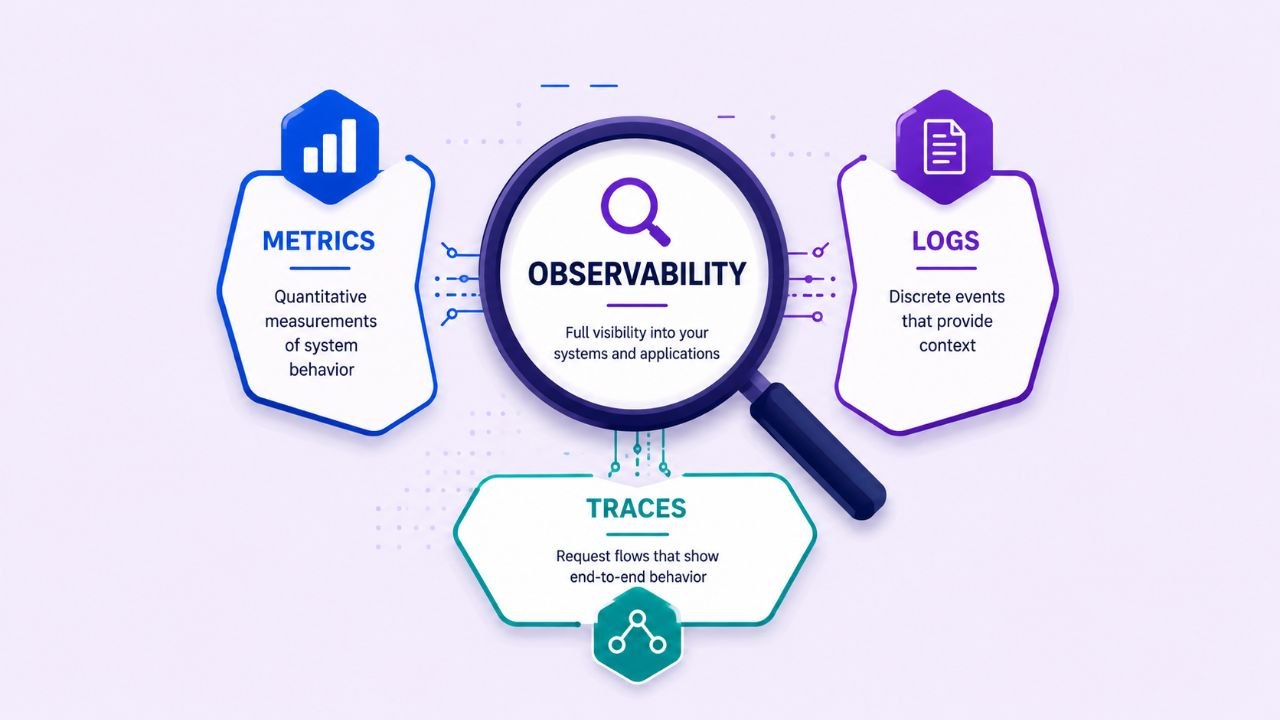

Introduction
Most engineers encounter observability only after something breaks.
You are deep in the zone on a new feature when an urgent incident gets escalated. The report from customer support is notoriously vague:
"The website is slow."
"Checkout is failing."
"The API is timing out."The challenge in modern systems is rarely fixing the bug once you find it. The real headache is finding where the problem lives in the first place.
Modern applications are highly distributed. A single user action - like clicking “Place Order” - might travel through a frontend, a checkout service, a payment gateway, a database, a cache, and a third-party shipping API before returning a response. When a request slows down or fails, identifying the root cause across this massive web of dependencies is incredibly difficult.
Observability exists to solve this problem. It helps us answer one fundamental question:
What is actually happening inside my system right now?
Monitoring vs. Observability
Many engineers use these terms interchangeably, but they represent two different operational mindsets.
Monitoring focuses on known failure modes. It watches specific metrics and alerts you when predefined thresholds are crossed (e.g., CPU usage exceeds 90%, or the HTTP error rate hits 5%). It answers the question:
Did a known problem happen?
Observability goes further. It gives you the power to debug systems from the outside without deploying new code, helping you navigate unknown failure modes. It answers the question:
Why did this problem happen?
Monitoring tells you WHEN a system is struggling. Observability tells you WHY.
What Is Telemetry?
To observe a system, you need data. Telemetry is the operational data generated and emitted by software while it runs. It includes events like a request starting, a database query taking 120ms, or a payment gateway timing out.
Telemetry is the raw material of observability. Everything we infer about our application’s health comes directly from it. In modern architectures, engineers often evaluate system health using the Four Golden Signals and collect telemetry through three primary forms: Metrics, Traces, and Logs.
The Four Golden Signals
Introduced in Google’s Site Reliability Engineering (SRE) book, the Four Golden Signals are the most critical elements to measure for any user-facing service.
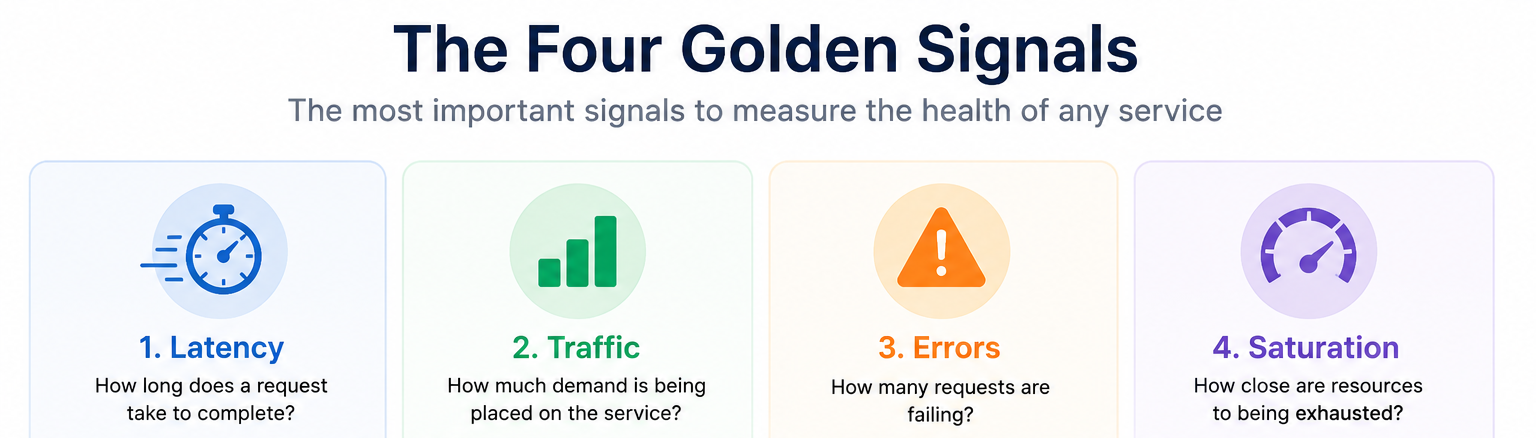
1. Latency
Latency measures how long a request takes to complete for example 100ms, 220ms, 2s etc. Users rarely care about your infrastructure’s memory consumption, they care about responsiveness.
When measuring latency, averages are an illusion. If 99 users experience a lightning-fast 10ms response, but 1 user experiences a brutal 10-second hang, your average latency sits at a reasonable-looking 110ms. The average completely hides the fact that 1% of your customer base is having a miserable experience.
To avoid this, engineering teams rely on latency percentiles:
p50 (Median)
The exact middle of your data. 50% of requests are faster than this, and 50% are slower. It represents your typical user experience.
p95 / p99 (Tail Latency)
The thresholds showing what the worst 5% or 1% of your users are experiencing. Production teams monitor these closely to isolate and fix performance bottlenecks before they spread.
2. Traffic
Traffic measures the demand being placed on your system. This is typically quantified by metrics like HTTP requests per second, database queries per second, or concurrent messages processing in a queue. Traffic provides vital context: high latency during a traffic spike points to a capacity bottleneck, while high latency during low traffic usually points to a software bug.
3. Errors
Errors measure the rate of requests that fail. This includes explicit failures (like HTTP 500 Internal Server Errors), implicit failures (like an HTTP 200 that returns the wrong payload), and policy failures (like a response taking longer than a 2-second timeout configuration).
4. Saturation
Saturation measures how close a specific system resource is to being completely exhausted. It tracks things like CPU utilization, memory allocation, disk I/O, or thread pool constraints. Saturation is a leading indicator of trouble; as resources approach 100% capacity, latency percentiles almost always begin to degrade rapidly.
Note: To make the concepts easier to understand, this article uses a sample e-commerce application composed of multiple services such as Frontend, Cart, Checkout, Payment, Product Catalog, and databases. Rather than using generic examples like “Service A” and “Service B”, we’ll refer to these services directly when explaining traces, spans, logs, and observability concepts.
The Three Pillars of Observability
To track these golden signals, modern systems emit three distinct types of telemetry: Metrics, Traces, and Logs.
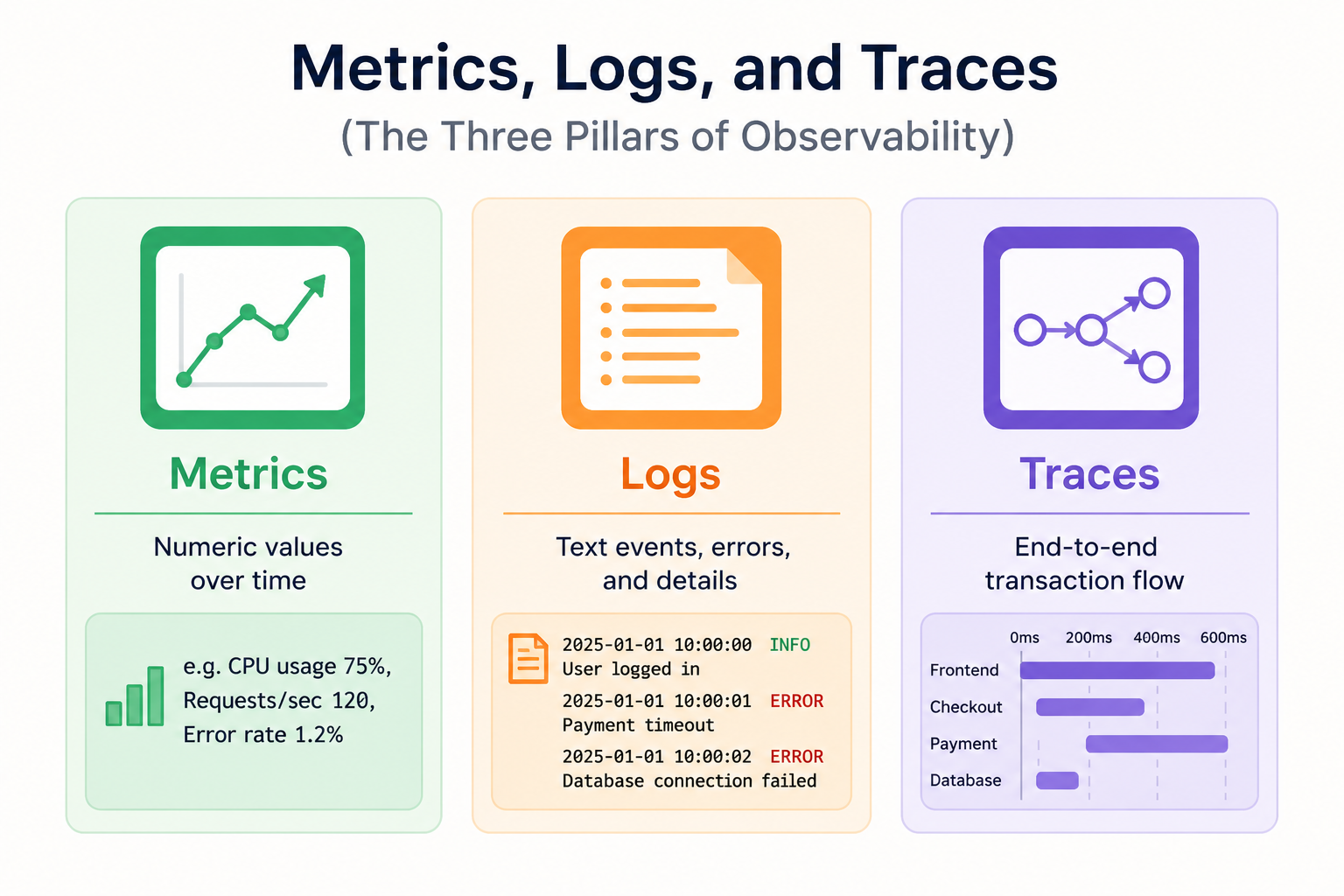
1. Metrics (How many? How much?)
Metrics are numeric values that tell us how many, how much, how often. For example how much of cpu, memory are in use.
CPU = 73%
Memory = 8GB
Requests/sec = 250Think of them as Numbers + Time collected over time. They are highly structured, incredibly efficient to store, and perfect for real-time alerting and dashboarding.
Modern systems like Prometheus store metrics as a time series, which consists of a metric name, key-value pairs called labels (or dimensions), and the numeric values over time.
http_requests_total{service="checkout", status="500"} | Value: 42Metrics tell us Something is wrong, but they not necessarily why.
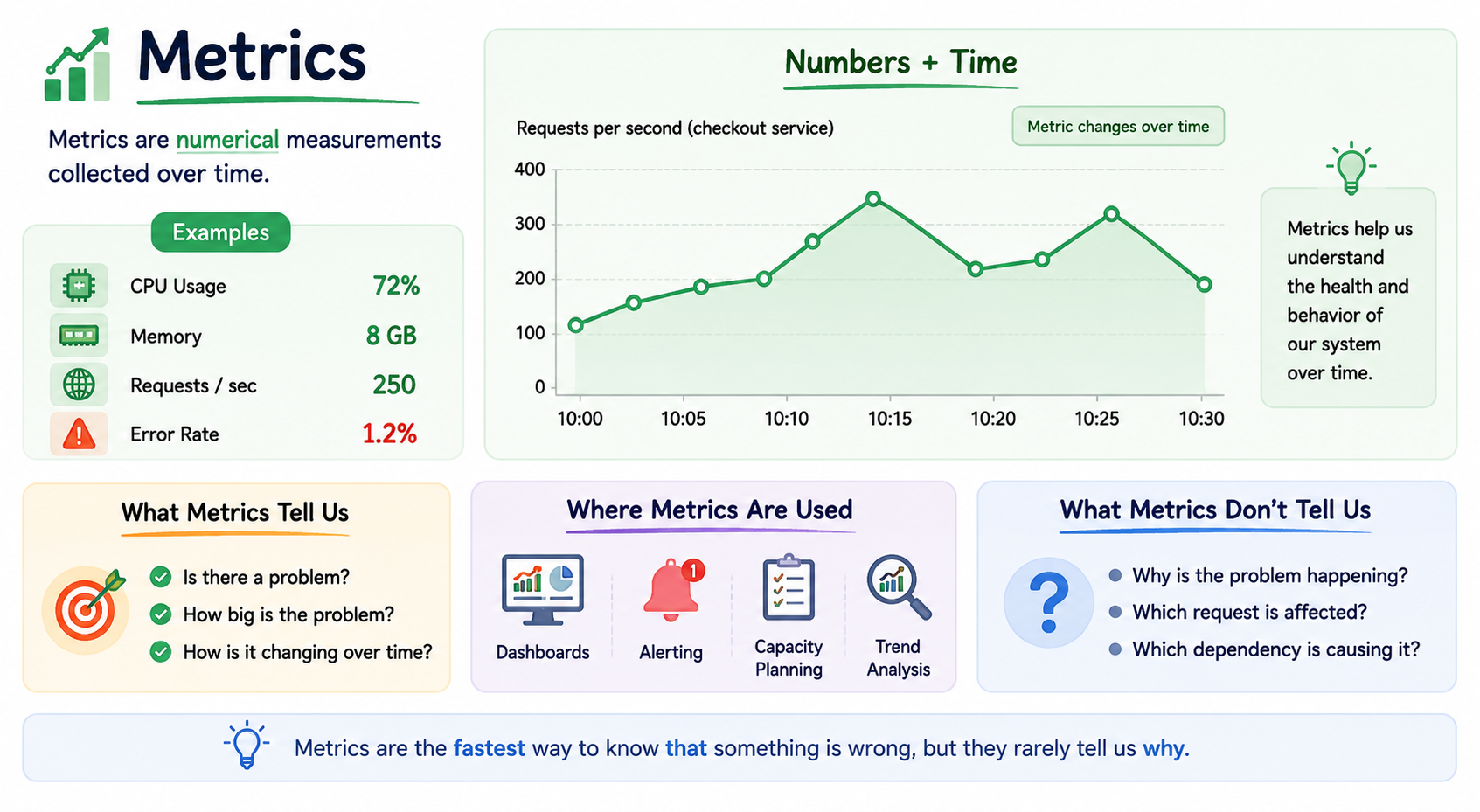
Metrics Deep Dive
Most modern metric systems store data as time series. A time series consists of:
Metric Name + Labels + Values over TimeExample:
http_requests_total{service="checkout"}This is one time series.
Change the label:
http_requests_total{service="payment"}Now it becomes a different time series.
This idea is fundamental to systems such as Prometheus.
Labels
Labels are dimensions attached to metrics.
Examples:
service=payment
region=ap-south-1
status=500Labels allow filtering, grouping, and aggregation.
Without labels " requests=1000" is not very useful.
With labels:
requests{service="payment"}Much more useful.
Labels transform raw numbers into meaningful telemetry.
Cardinality
Every unique label combination creates a new time series.
Example:
service=checkout
service=payment
service=cartThree series. Now imagine:
user_id=1
user_id=2
user_id=3
...
user_id=1000000One million series. This is called high cardinality. High-cardinality metrics are one of the most common causes of performance and storage problems.
Core Metrics Types
Counter: A value that only goes up (e.g., total_requests_received). It resets to zero only if the application restarts.
Gauge: A value that can fluctuate up and down fluidly (e.g., current_memory_usage or cpu_temperature).
Histogram: Measures the statistical distribution of events (like request durations) by sorting them into configurable data buckets. This is exactly how complex backend systems calculate p95 and p99 latencies efficiently at scale.
Summary:
Similar to a histogram, but calculates percentiles directly on the client application side rather than waiting for the central monitoring server to process the raw buckets.
2. Traces (Where is it happening?)
While metrics tell you that your application’s error rate is spiking, a distributed trace tells you exactly where the request is breaking down across your infrastructure. A trace represents the end-to-end journey of a single user request through your entire network of services.
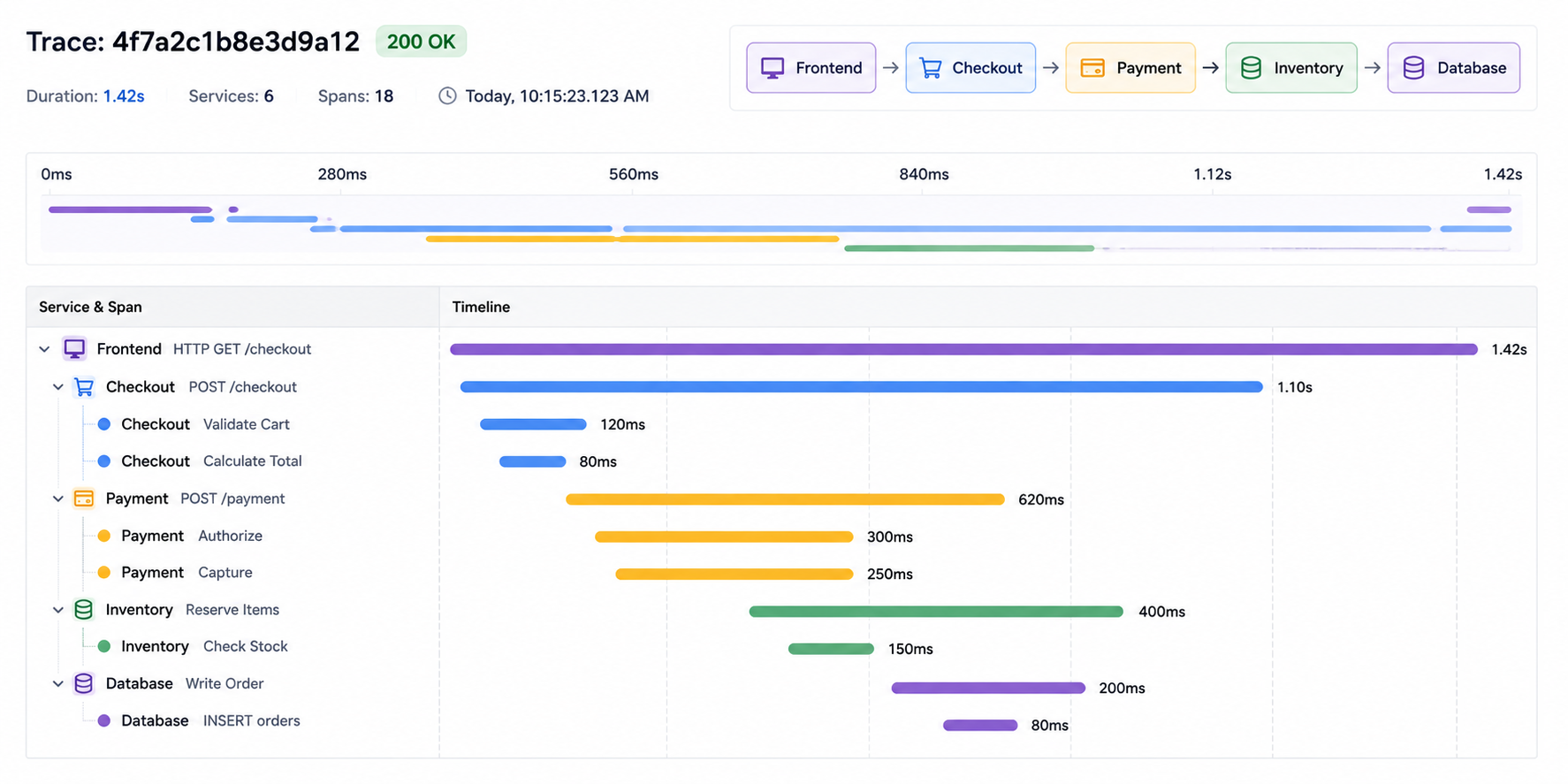
Imagine a customer placing an order. The request travels through:
Frontend
 ↓
Checkout
 ↓
Payment
 ↓
DatabaseTracing records that journey.
Example:
Frontend     100ms
 ├── Checkout   50ms
└── Payment 800msImmediately we know “Payment” is slow.
Tracing is the foundation of debugging distributed systems.
Span
A span is a single unit of work.
Examples:
- Database Query
- Cache Lookup
- HTTP Request
- Payment Processing
A span typically contains:
- Name
- Start Time
- End Time
- Duration
- Status
- Attributes
Think of a span as A timed operation.
Trace vs Span
A trace contains many spans.
Example:
Frontend Request
 ├── Product Catalog Call
 ├── Recommendation Call
└── Payment CallEach operation is a span. Together they form a trace.
A trace is the complete request journey while span is one step within that journey.
Parent and Child Spans
Spans can create other spans for example Frontend initiated checkout, Frontend = Parent Span and Checkout = Child Span
Frontend
  ↓
Checkout
Frontend initiated Checkout. Tracing systems use these relationships to reconstruct request flows.
Trace ID
Every trace has a unique identifier.
Example:
trace_id = abc123All spans belonging to the same request share this identifier.
Span ID
Every span has its own unique identifier.
span_id = xyz789Parent Span ID
When a span creates another span, the child stores the parent’s span identifier.
Trace ABC123
Frontend (Span A)
  ↓
Checkout (Span B)
  ↓
Payment (Span C)This relationship allows tracing systems to reconstruct request hierarchies.
Context Propagation
How does one service (Payment) know it belongs to the same request?
The answer is context propagation.
Suppose:
Frontend
 ↓
Checkout
 ↓
PaymentThe Trace ID and related metadata are passed between services.
Without propagation:
Frontend Trace
Checkout Trace
Payment Traceappear unrelated.
With propagation, becomes one connected trace.
Frontend
 ↓
Checkout
 ↓
PaymentThis mechanism is what makes distributed tracing possible.
3. Logs (What exactly happened?)
Metrics tell us that something happened. Traces tell where the issue originates but Logs tell us what exactly happened.
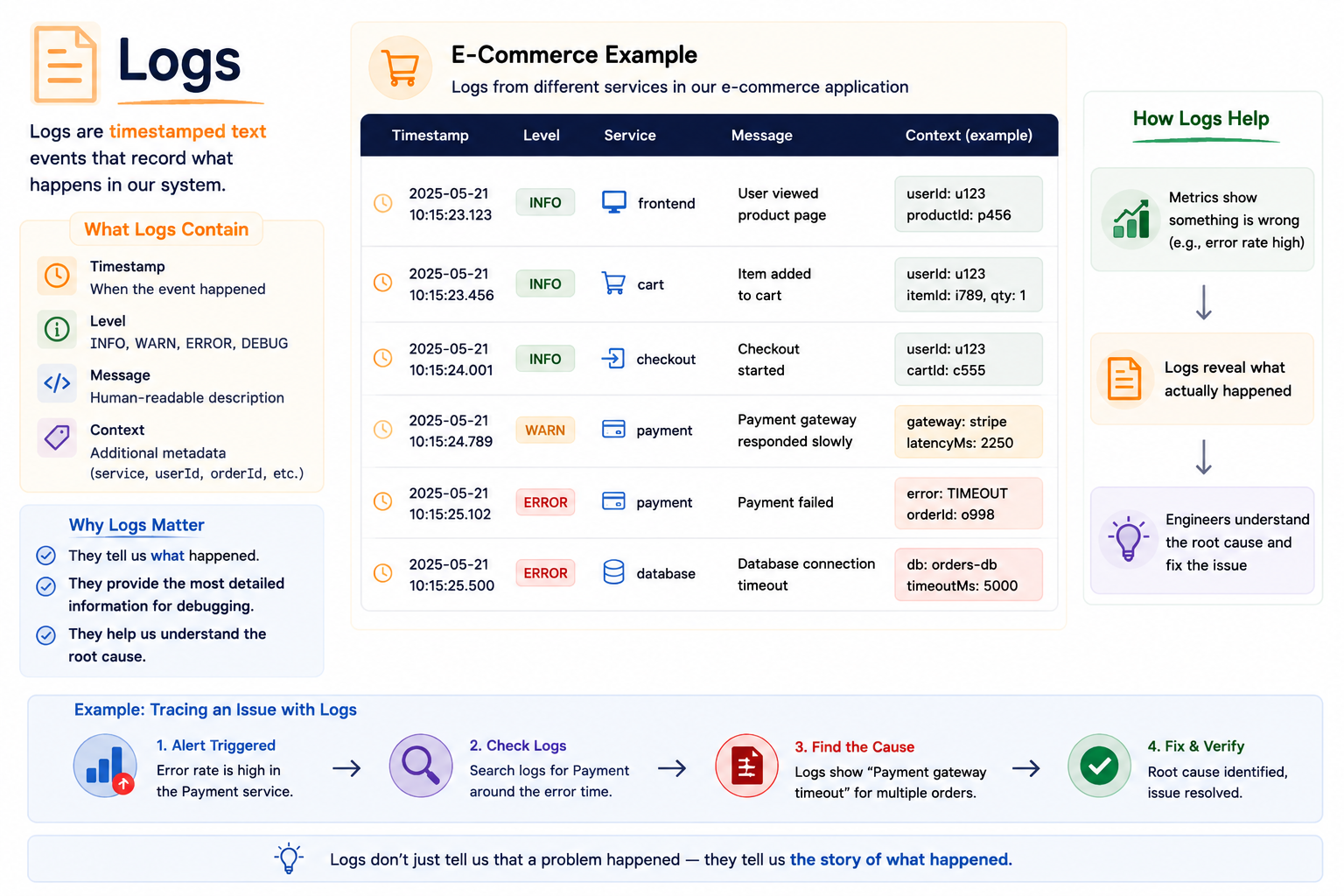
2025-01-01 10:00:00 INFO User logged in
2025-01-01 10:00:01 ERROR Payment timeout
2025-01-01 10:00:02 ERROR Database connection failedMetrics might tell us:
Payment Errors = 500Logs explain why those errors occurred. It provide the most detailed level of information, granular, timestamped record of an isolated event. They represent the definitive story of an execution path.
2026-06-02 14:10:05 ERROR [payment-service] Line 42:
Credit card processing failed.
Reason: Connection refused by gateway.While storing logs for billions of successful requests is expensive and hard to query efficiently, a detailed error log is completely indispensable when you need to know the precise exception or code block that caused a transaction to fail.
Correlation: Putting It All Together
The real power of observability appears when metrics, traces, and logs work together.
Metric tells us latency suddenly increases.
Traces tell us Payment service is slow.
Logs tell us Database connection timeout.
The ability to move between metrics, traces, and logs while investigating the same incident is called correlation.
Modern observability platforms are built around this idea.
When investigating a production issue:
- Metrics answer: Is there a problem?
- Traces answer: Where is the problem?
- Logs answer: What exactly happened?
Observability is not about collecting more telemetry. It is about reducing the time required to understand and resolve production issues.
By connecting these layers, you drastically cut down your Mean Time to Resolution (MTTR), transforming confusing, out-of-context charts into a clear window showing exactly how your distributed applications are behaving in the wild.
Next: OpenTelemetry
Throughout this article, we’ve focused on understanding observability concepts rather than specific tools.
In modern distributed systems, OpenTelemetry (OTel) has emerged as the industry standard for generating, transporting, and processing telemetry.
Whether telemetry ultimately ends up in Prometheus, Jaeger, OpenSearch, Grafana, New Relic, Datadog, or another observability platform, OpenTelemetry is often the foundation that makes it possible.
Understanding OpenTelemetry is becoming an essential skill for engineers working with modern cloud-native systems.
In the next article, we’ll move from concepts to implementation and explore OpenTelemetry along with the tools commonly used to collect, store, and visualize telemetry.