Terraform Modules — Simplify, Organise and Reuse Your IAC
A Terraform module is a container/template for multiple resources that are used together. Modules are a way to organize and reuse code in Terraform, making infrastructure management more efficient and maintainable.
We first define the resource templates, and then we call the templates from outside of the module structures and we can even modify them as per our needs.
A typical module module looks something this this:
.
├── main.tf
├── outputs.tf
├── README.md
└── variables.tf
Example:
A basic example to create IAM users, in this case instead of creating multiple terraform files or changing one config again and again, we can create a base structure.
iam_users
    ├── main.tf
    ├── output.tf
    └── variables.tf
With main.tf for user name also we have a variable here, so that we can override it from the child module.
The output.tf as usual prints the details of the user post creation.
#main.tf
provider "aws" {
    region = "ap-south-1"
}
locals {
    iam_user_prefix = "my_iam_user"
}
resource "aws_iam_user" "my_iam_user" {
    name = "${local.iam_user_prefix}_${var.environment}"
}

# ----------------- #

#varibales.tf
variable "environment" {
  description = "Environment for the IAM user (e.g., dev, qa, prod)"
  default     = "default"
  type        = string
}
Ok, so now since the root module is set up, lets create our child module and here, say for example I have two environments dev and dev2 (take any name). I just need to call the root module from these two files.
├── dev
│   └── users
│       └── main.tf
And the main.tf calls the root module by specifying the path of the module we want to run.
module "user_module" {

    source = "../../iam_users"
    environment = "dev"
}
In this example, I have all the config under Modules dir. The iam_user dir contains the config for creating an iam user.
The module name “user_module” is user defined and can be anything.
The dev environment specifies the location, in this case, two directories back. Also passes the value for var “environment”.
So the full dir structure looks like this.
sagar@DELL-G5:~/tofu/Modules$ tree
.
├── dev
│   └── users
│       └── main.tf
├── dev2
│   └── users
│       └── main.tf
└── iam_users
    ├── main.tf
    ├── output.tf
    └── variables.tf
5 directories, 5 files
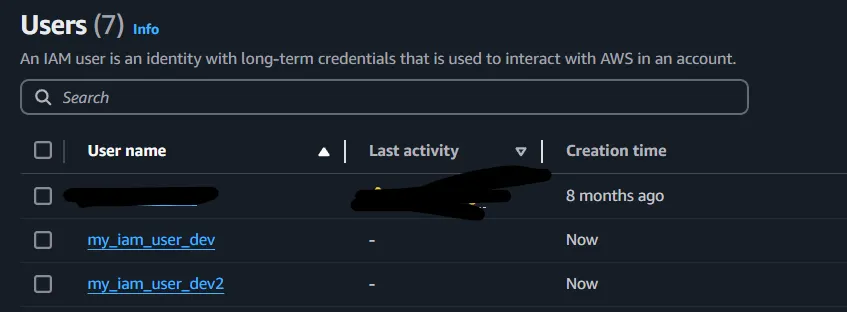
Cool, we just need to go to dev/users and run the config as usual to create my_iam_user_dev and similarly running from dev2/users would create my_iam_user_dev2.
So lets see if it works as expected, do the tf init and tf plan and we should be able to see the name shown. Apply the config and indeed the was created.

Alright, that was a fairly easy and quick example to understand modules.
Community Modules:
Terraform modules are highly reusable, and one of their greatest strengths is the availability of community modules. These modules are pre-built configurations shared by the Terraform community, which save time and effort when setting up common infrastructure components like S3 buckets, IAM roles, VPCs, and more.
Here’s how simple it is to use a community module:
- Find a Module: Look for a suitable module in the Terraform Registry.
- Copy Configuration: Copy the module usage example into your code.
- Add the Provider Block: Include the required provider (e.g., AWS) in your configuration.
- Run Terraform Commands: Initialize and apply the configuration.
Example:
I just copied the S3 bucket module.
provider "aws" {
  region = "ap-south-1"
}
module "s3_bucket" {
  source = "terraform-aws-modules/s3-bucket/aws"
  bucket = "<your_bucket_name>"
  acl    = "private"
  control_object_ownership = true
  object_ownership         = "ObjectWriter"
  versioning = {
    enabled = true
  }
}
When we define the source as “terraform-aws-modules”, and do init, terraform automatically fetches the modules.
Conclusion:
Terraform modules simplify infrastructure management by organizing and reusing code. Whether you create custom modules or use community-provided ones, it save time, ensure consistency, and make our IaC more maintainable. Start small and go modular.
Read More on Terraform: